Εγκατάσταση Περιβάλλοντος
Η εγκατάσταση που ακολουθεί είναι για Linux (Ubuntu). Χρησιμοποίησε Java 8 για συμβατότητα με javax.* και GlassFish 4.1.1.
📋 Χρειαζόμαστε NetBeans 8.2 γιατί τα νεότερα εργαλεία/εκδόσεις έχουν περάσει στο jakarta.* και δεν “κουμπώνουν” με την παλιά ύλη.
1
Βασικά εργαλεία
sudo apt update
sudo apt install -y wget unzip ca-certificates
2
Εγκατάσταση Java 8
sudo apt install -y openjdk-8-jdk
/usr/lib/jvm/java-1.8.0-openjdk-amd64/bin/java -version
3
NetBeans 8.2
cd ~/Downloads
wget -O nb82.sh "https://archive.org/download/jdk-8u111-nb-8_2/jdk-8u111-nb-8_2-linux-x64.sh"
chmod +x nb82.sh
./nb82.sh
4
Ρύθμιση NetBeans για Java 8
nano /home/jimpa/netbeans-8.2/etc/netbeans.conf

netbeans_jdkhome="/usr/lib/jvm/java-1.8.0-openjdk-amd64"
Αν είχες άλλη JDK (π.χ. /home/jimpa/jdk1.8.0_111), την αντικαθιστάς με το OpenJDK 8 του συστήματος.
Για SSL/TLS προβλήματα στα plugins, πρόσθεσε στο τέλος της γραμμής netbeans_default_options:
netbeans_default_options="... -J-Dhttps.protocols=TLSv1.2 -J-Djdk.tls.client.protocols=TLSv1.2"Πλήρες περιεχόμενο: /home/jimpa/netbeans-8.2/etc/netbeans.conf
# Default locations of userdir and cachedir:
# (http://wiki.netbeans.org/FaqWhatIsUserdir)
#
# On Windows ${DEFAULT_USERDIR_ROOT} will be replaced by the launcher
# with "\NetBeans" where  is user's
# value of "AppData" key in Windows Registry under
# "HKCU\Software\Microsoft\Windows\CurrentVersion\Explorer\Shell Folders"
# and ${DEFAULT_CACHEDIR_ROOT} will be replaced by the launcher
# with "\NetBeans\Cache" where  is user's
# value of "Local AppData" key in Windows Registry under
# "HKCU\Software\Microsoft\Windows\CurrentVersion\Explorer\Shell Folders"
#
# On Mac ${DEFAULT_USERDIR_ROOT} will be replaced by the launcher
# with "~/Library/Application Support/NetBeans" and
# ${DEFAULT_CACHEDIR_ROOT} with "~/Library/Caches/NetBeans"
#
# On other systems ${DEFAULT_USERDIR_ROOT} will be replaced by the launcher
# with "~/.netbeans" and ${DEFAULT_CACHEDIR_ROOT} with "~/.cache/netbeans"
#
# You can also use ${HOME} variable which will be replaced with
# user.home JVM system property value. This variable is valid only in
# netbeans_default_userdir and netbeans_default_cachedir properties.
#
# NOTE: If you specify a non-default userdir path on command line
# (--userdir option) and don't specify a cachedir path (--cachedir option),
# cachedir will be in "/var/cache".
#
# Cachedir must be different from userdir. The same cachedir and userdir
# would cause problems.
#
netbeans_default_userdir="${DEFAULT_USERDIR_ROOT}/8.2"
netbeans_default_cachedir="${DEFAULT_CACHEDIR_ROOT}/8.2"

# Options used by NetBeans launcher by default:
# (can be overridden by explicit command line switches)
#
# Note that default -Xmx is selected for you automatically.
# You can find these values in var/log/messages.log file in your userdir.
# The automatically selected value can be overridden by specifying -J-Xmx
# here or on the command line.
#
# If you specify the heap size explicitly, you may also want to enable
# Concurrent Mark & Sweep garbage collector.
# (see http://wiki.netbeans.org/FaqGCPauses)
#
netbeans_default_options="-J-client -J-Xss2m -J-Xms32m -J-Dapple.laf.useScreenMenuBar=true -J-Dapple.awt.graphics.UseQuartz=true -J-Dsun.java2d.noddraw=true -J-Dsun.java2d.dpiaware=true -J-Dsun.zip.disableMemoryMapping=true -J-Dhttps.protocols=TLSv1.2 -J-Djdk.tls.client.protocols=TLSv1.2"

# Default location of JDK:
# (set by installer or commented out if launcher should decide)
#
# It can be overridden on command line by using --jdkhome
# Be careful when changing jdkhome.
# There are two NetBeans launchers for Windows (32-bit and 64-bit) and
# installer points to one of those in the NetBeans application shortcut
# based on the Java version selected at installation time.
#
netbeans_jdkhome="/usr/lib/jvm/java-1.8.0-openjdk-amd64"

# Additional module clusters:
# using ${path.separator} (';' on Windows or ':' on Unix):
#
#netbeans_extraclusters="/absolute/path/to/cluster1:/absolute/path/to/cluster2"
5
GlassFish 4.1.1
cd ~/Downloads
wget -O glassfish-4.1.1.zip "https://download.oracle.com/glassfish/4.1.1/release/glassfish-4.1.1.zip"
mkdir -p /home/jimpa/GlassFish_Server1
unzip -q glassfish-4.1.1.zip -d /home/jimpa/GlassFish_Server1
6
Ρύθμιση GlassFish για Java 8
nano /home/jimpa/GlassFish_Server1/glassfish/config/asenv.conf

AS_JAVA="/usr/lib/jvm/java-1.8.0-openjdk-amd64"
Το κάναμε επειδή το GlassFish έβγαζε: “Your JDK is version 0” και δεν έβρισκε Java.
Πλήρες περιεχόμενο: /home/jimpa/GlassFish_Server1/glassfish/config/asenv.conf
#
# Copyright (c) 2004, 2018 Oracle and/or its affiliates. All rights reserved.
#
# This program and the accompanying materials are made available under the
# terms of the Eclipse Public License v. 2.0, which is available at
# http://www.eclipse.org/legal/epl-2.0.
#
# This Source Code may also be made available under the following Secondary
# Licenses when the conditions for such availability set forth in the
# Eclipse Public License v. 2.0 are satisfied: GNU General Public License,
# version 2 with the GNU Classpath Exception, which is available at
# https://www.gnu.org/software/classpath/license.html.
#
# SPDX-License-Identifier: EPL-2.0 OR GPL-2.0 WITH Classpath-exception-2.0
#

#
#                       * * *    N O T E     * * *
#
# Although the lines in this file are formatted as environment
# variable assignments, this file is NOT typically invoked as a script
# from another script to define these variables.  Rather, this file is read
# and processed by a server as it starts up.  That scanning code resolves
# the relative paths against the GlassFish installation directory.
#
# Yet, this file is also where users of earlier versions have sometimes added
# a definition of AS_JAVA to control which version of Java GlassFish
# should use.  As a result, in order to run a user-specified version of Java,
# the asadmin and appclient scripts do indeed invoke this file as a
# script - but ONLY to define AS_JAVA.  Any calling script should not
# rely on the other settings because the relative paths will be resolved
# against the current directory when the calling script is run, not the
# installation directory of GlassFish, and such resolution will not work
# correctly unless the script happens to be run from the GlassFish installation
# directory.
#

AS_IMQ_LIB="../../mq/lib"
AS_IMQ_BIN="../../mq/bin"
AS_CONFIG="../config"
AS_INSTALL=".."
AS_DEF_DOMAINS_PATH="../domains"
AS_DEF_NODES_PATH="../nodes"
AS_DERBY_INSTALL="../../javadb"
7
Εκκίνηση GlassFish
cd /home/jimpa/GlassFish_Server1/glassfish/bin
./asadmin start-domain
Σε zsh, αν έβγαινε command not found: asadmin, τρέχεις πάντα με ./ ή βάζεις το bin στο PATH:
export PATH="/home/jimpa/GlassFish_Server1/glassfish/bin:$PATH"
asadmin start-domain
SOAP Plugin στο NetBeans
8
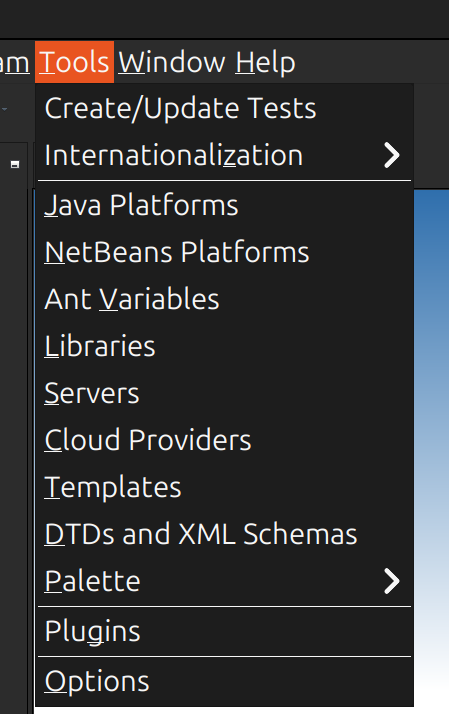
Άνοιγμα Plugin Manager
Από το μενού πήγαινε Tools → Plugins.
9
Εγκατάσταση SOAP Plugin
Στο tab Available Plugins βρες το SOAP Web Services και κάνε install.
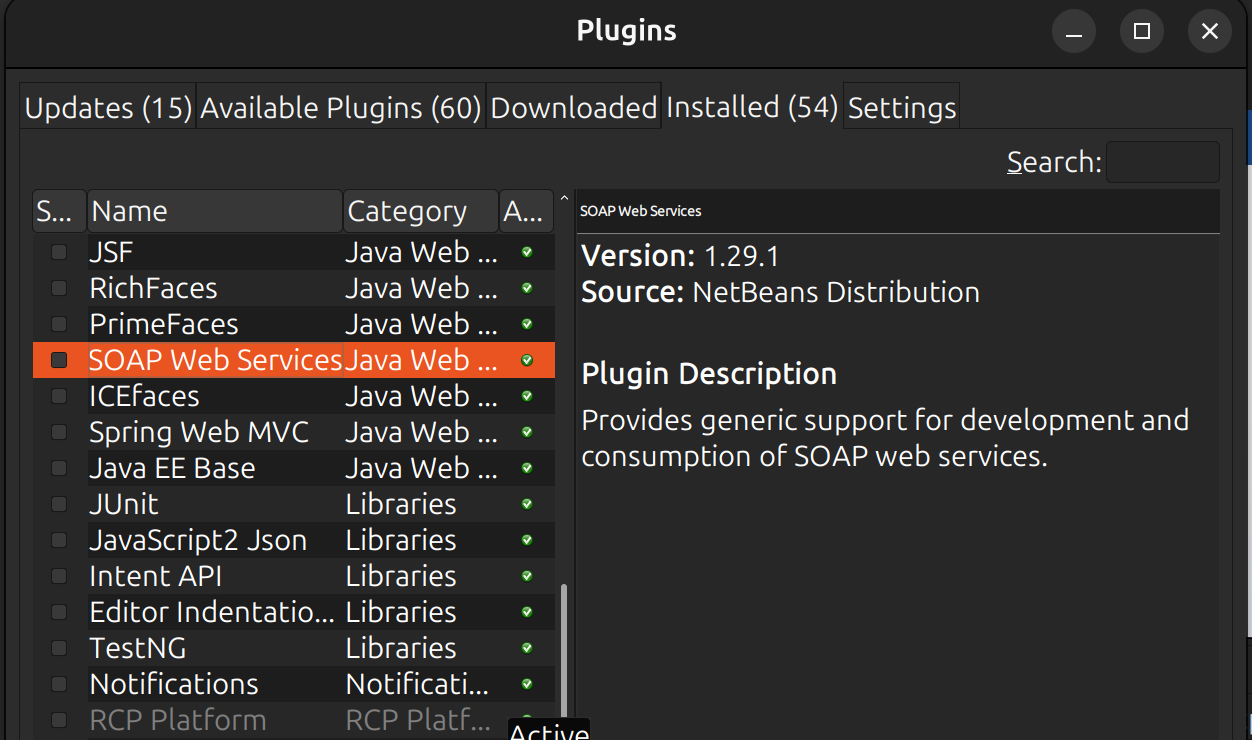
💡 Αν είχες timeout στα Update Centers, απενεργοποίησε το Plugin Portal και άφησε μόνο Distribution + Certified.
💡 Έλεγξε το GlassFish στο
http://localhost:4848.